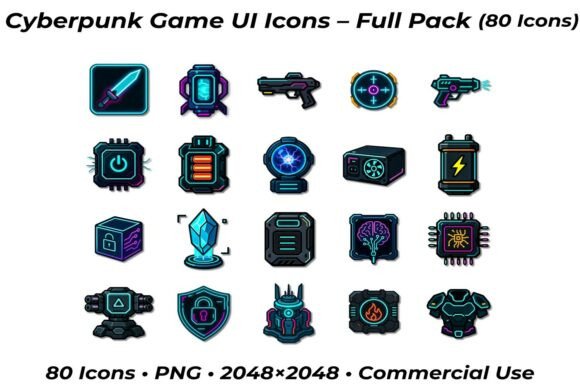
Cyberpunk Game UI Icons – Full Pack 80: A Practical Guide for Developers
Achieving a cohesive futuristic aesthetic is one of the most common challenges in modern game development and interface design. The Cyberpunk Game UI Icons – Full Pack 80 addresses this specific need by providing a curated library of high-resolution assets tailored for sci-fi projects. For developers, UI/UX designers, and indie creators, this pack offers more than just visual flair; it provides a foundational language for player interaction. Understanding how to leverage these assets effectively can mean the difference between a disjointed prototype and a polished, immersive experience.
However, acquiring a premium asset pack is only the first step. Many creators overlook critical technical and stylistic details that impact the final product. From resolution management to licensing compliance, avoiding common pitfalls ensures that your investment in the Cyberpunk Game UI Icons – Full Pack 80 PNG translates into tangible quality improvements for your game or application.
Evaluating Visual Consistency Before Integration
The most frequent mistake designers make when adopting a themed icon set is assuming that "cyberpunk" is a monolithic style. The genre encompasses everything from clean, corporate futurism to gritty, neon-soaked dystopia. Before importing the full pack into your project, you must audit the specific artistic direction of these 80 icons against your existing art style.
A common oversight is mixing line weights and glow effects inconsistently. If your game’s HUD uses thin, sharp vector lines, but the selected icons feature heavy, painterly textures with soft outer glows, the interface will feel like an afterthought rather than an integrated system. This visual friction breaks immersion and signals a lack of polish to the player. To avoid this, test three to five representative icons from different categories—such as Weapons, Energy, and Data—directly within your engine or design software at actual display size. Ensure the stroke width, corner radius, and color saturation harmonize with your background elements and typography.
Managing High-Resolution Assets Efficiently
This pack delivers icons at 2048 × 2048 pixels. While this resolution is excellent for print or large-format displays, using native 2K PNGs directly in a mobile game or standard web interface is a significant performance error. Large file sizes increase load times, consume excessive VRAM, and can cause rendering artifacts when scaled down aggressively by the game engine.
Professional workflow dictates creating optimized derivatives. Do not rely solely on real-time scaling. Instead, generate mipmaps or pre-scaled versions (e.g., 64px, 128px, 256px) appropriate for your target platform. This preserves the crispness of the transparent backgrounds and ensures that fine details in complex icons, like the circuitry on a data server or the ridges on a laser pistol, remain legible at smaller sizes. Proper asset management respects both the user's hardware and the integrity of the original artwork.
Navigating Commercial Licensing and Usage Rights
One of the primary value propositions of the Cyberpunk Game UI Icons – Full Pack 80 is the inclusion of commercial use rights. Yet, misunderstanding the scope of these rights remains a prevalent issue for freelancers and small studios. Assuming "commercial use" grants unlimited freedom can lead to legal complications or platform takedowns later in development.
Always verify the specific license terms regarding redistribution and modification. Typically, you are permitted to use the icons as part of a larger, interactive project like a video game or app. However, reselling the icons as standalone assets, including them in a competing UI kit, or using them in NFT marketplaces often violates standard commercial licenses. Clarifying these boundaries early protects your project from future liability. When in doubt, treat the assets as tools for creation, not products for resale.
Semantic Clarity Over Thematic Flair
In the pursuit of a high-tech look, designers sometimes prioritize aesthetics over usability. The Cyberpunk Game UI Icons – Full Pack 80 includes stylized representations of shields, batteries, and AI indicators. A practical warning here is to ensure that stylistic abstraction does not compromise icon recognition. Players should understand an icon’s function instantly without needing a tooltip.
If a shield icon is so heavily stylized with glitch effects that it resembles a broken data link, you have created a usability barrier. Test your icon choices with users who are unfamiliar with your game. If they cannot correctly identify the "Attack" or "Defense" symbols within a second, consider using a clearer variant from the pack or adjusting the contrast. Good UI design serves gameplay first; the cyberpunk theme should enhance, not obscure, communication.
Technical Specifications and Workflow Best Practices
Leveraging the full potential of this mega pack requires attention to technical specifications beyond simple file formats. The transparent PNG format is industry-standard for UI, but it demands proper handling to avoid visual defects.
- Alpha Channel Integrity: When editing or resizing, ensure your software preserves the alpha channel. Accidental flattening against a white or black background ruins the transparency, making integration into dynamic HUDs impossible without tedious masking.
- Color Space Awareness: Verify whether the source files are sRGB or Linear. Cyberpunk aesthetics often rely on vibrant neons. Importing linear assets into an sRGB pipeline (or vice versa) can result in washed-out colors or overly harsh contrast. Match the color space to your project’s rendering settings immediately upon import.
- Batch Processing: With 80 distinct assets, manual renaming and organizing is inefficient. Use batch processing tools to standardize file naming conventions (e.g., ui_icon_weapon_laser_01.png) before importing. This saves hours of debugging when referencing assets in code or animation controllers.
Strategic Application Across Project Types
Different projects require different approaches to this asset pack. For indie game developers building a full HUD, consistency across all four categories (Weapons, Energy, Data, Defense) is paramount. You might use the entire set to maintain a unified visual language. Conversely, marketers or bloggers creating promotional material may only need specific high-impact icons like the AI server or laser sword to convey a theme quickly.
For prototyping and demos, the 2048x2048 resolution allows you to create impressive pitch decks and concept art without worrying about pixelation. However, transition to optimized assets as soon as you move to functional development. Educators and tutorial creators should also note that the clear, distinct designs make these icons excellent for teaching UI layout principles, as they provide recognizable anchors for students learning hierarchy and spacing.
Making an Informed Decision
Before finalizing your acquisition of the Cyberpunk Game UI Icons – Full Pack 80, conduct a gap analysis of your current project needs. Count exactly how many unique icon states you require. Does the pack cover your essential verbs and nouns? Are there enough variations for active, inactive, and hover states, or will you need to create custom modifications?
Consider the long-term scalability of your interface. If you anticipate expanding your game with DLC or updates, ensure the art style is versatile enough to accommodate new icons you might create later. The strength of this mega pack lies in its comprehensive coverage of core cyberpunk tropes, but successful implementation depends entirely on your diligence in technical optimization, semantic testing, and licensing compliance. By approaching these assets with a professional, corrective mindset, you transform a simple download into a robust component of your design system, ultimately saving time and elevating the perceived quality of your work.