Designing a Tic Tac Toe Game with Glowforge: A Fun and Educational DIY Project
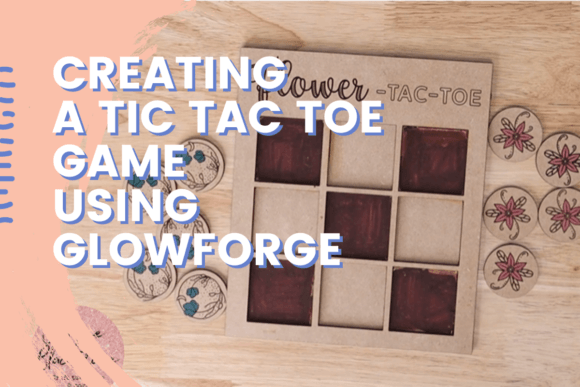
Creating a Tic Tac Toe game using a Glowforge laser cutter is not just a fun and creative endeavor—it's also an educational experience that teaches strategic thinking and design fundamentals. Whether you're a hobbyist, a parent looking for a meaningful craft project, or someone interested in learning more about laser cutting, this hands-on activity offers something for everyone. In this article, we'll explore how to design a Tic Tac Toe game using Inkscape and bring it to life with a Glowforge machine, guided by the expertise of instructor Corinne.
What Is Glowforge and Why Use It for This Project?
Glowforge is a powerful desktop laser cutter that allows users to engrave, cut, and shape materials like wood, acrylic, and leather with precision and ease. Its intuitive interface and compatibility with vector design software make it an ideal tool for crafting custom games like Tic Tac Toe. Using Glowforge, you can transform a simple design into a beautifully crafted, functional object in a matter of hours.
This project is perfect for beginners and experienced makers alike. It introduces the basics of laser cutting while also offering opportunities for customization and creativity. Whether you're making the game for personal use or as a thoughtful gift, the result is a durable, stylish, and interactive piece that can be enjoyed for years.
Why Tic Tac Toe Is More Than Just a Simple Game
Tic Tac Toe may seem like a basic game, but it's actually a powerful tool for teaching critical thinking and strategy. Players must anticipate their opponent’s moves, plan ahead, and adapt their tactics—skills that are valuable in both personal and professional settings. By designing and building your own Tic Tac Toe board, you not only gain technical skills in design and fabrication but also reinforce the cognitive benefits of gameplay.
- Encourages strategic thinking and problem-solving
- Promotes hand-eye coordination and spatial reasoning
- Offers an accessible way to introduce children to game theory
This combination of mental engagement and hands-on creation makes the Tic Tac Toe project especially appealing for educators, parents, and hobbyists looking to blend learning with creativity.
Getting Started with Inkscape: The Design Foundation
The first step in creating your Tic Tac Toe game is designing the board and pieces using Inkscape, a free and open-source vector graphics editor. Inkscape provides a flexible platform for creating scalable designs that are compatible with Glowforge’s laser cutting system.
Corinne, your guide in this project, walks you through each step of the design process, ensuring that even those with no prior experience can follow along with confidence. Here's a general overview of what to expect:
- Setting up your canvas to match the size of your material
- Creating the grid layout for the Tic Tac Toe board
- Designing the X and O pieces with balanced proportions
- Adding engravings or labels for a personalized touch
- Preparing the file for export to the Glowforge software
Throughout the process, you'll learn how to manipulate shapes, adjust stroke settings for laser cutting, and optimize your design for clean, precise cuts. Corinne emphasizes the importance of testing and iterating on your design before final production, helping you avoid common pitfalls and achieve professional results.
Choosing the Right Materials for Your Tic Tac Toe Game
One of the joys of using Glowforge is the ability to work with a wide range of materials. For your Tic Tac Toe game, you might consider the following options:
- Hardwood plywood for a classic, durable board
- Acrylic sheets for a modern, translucent look
- Colored acrylic or veneer for contrasting X and O pieces
Each material has its own unique aesthetic and cutting requirements, so it's important to calibrate your Glowforge settings accordingly. Corinne provides detailed guidance on power, speed, and focus settings for each material type, ensuring that your final product looks polished and functions well.
Bringing Your Design to Life with Glowforge
Once your design is complete and your materials are selected, it's time to load your file into the Glowforge app and begin cutting. The process is surprisingly straightforward, especially with Corinne’s step-by-step instructions guiding you through the setup and execution phases.
Here’s what happens during the laser cutting process:
- The laser precisely follows your Inkscape design paths
- Cuts are made with high accuracy, ensuring clean edges and perfect alignment
- Engraving details are added to enhance the board’s appearance
- Each piece is carefully removed from the material sheet
After cutting, a bit of light sanding or polishing may be needed to smooth any rough edges. Once assembled, your Tic Tac Toe game is ready to play and display.
Customization Ideas for a Personal Touch
One of the best parts of this project is the opportunity to personalize your game. Whether you're making it as a gift or for your own enjoyment, a few custom touches can elevate the final product:
- Engrave names or initials on the board or pieces
- Add themed designs for holidays, birthdays, or special events
- Use contrasting materials for X and O to enhance visual appeal
- Incorporate educational elements like numbers or letters for younger players
These customizations not only make the game more engaging but also reflect your creativity and attention to detail. Corinne encourages students to experiment with different design elements, helping them discover new ways to express themselves through laser cutting.
Why This Project Is Perfect for Gifting
Whether it's for a birthday, holiday, or housewarming, a handmade Tic Tac Toe game is a thoughtful and memorable gift. Unlike mass-produced toys, a custom laser-cut game tells a story of craftsmanship and care. It's also a gift that can be enjoyed by people of all ages, making it ideal for families, friends, or colleagues.
Additionally, because the game can be tailored to match the recipient’s preferences or interests, it becomes a truly unique and personal item. The ability to create something meaningful with your own hands—and then share it with others—adds an emotional dimension to the project that goes beyond the physical object itself.
Conclusion: A Gateway to Creative and Educational Exploration
Creating a Tic Tac Toe game using Glowforge and Inkscape is more than just a craft project—it's a gateway to learning valuable design, technical, and strategic skills. Under Corinne’s guidance, you’ll gain hands-on experience with laser cutting, vector design, and creative problem-solving, all while producing a beautiful and functional game.
Whether you're a beginner looking to explore new creative tools or an experienced maker seeking a meaningful project, this Tic Tac Toe tutorial offers a rewarding and enriching experience. By combining education with entertainment, it exemplifies how modern technology can be used to foster creativity, critical thinking, and personal expression.
So why not start today? Gather your materials, fire up Inkscape, and let Glowforge help you bring your Tic Tac Toe vision to life. You might just discover a new hobby—and a game that brings joy to your home or makes the perfect gift for someone special.