Showcase Your Game Card Designs with the 5x7 Mockup Set
Designers working on game cards, printable stationery, or card-based products need a reliable way to present their work professionally. The Game Cards Mockup, 5x7 offers a clean, customizable solution for previewing and showcasing card designs before they go to print or digital distribution. Whether you're preparing for an Etsy listing, client presentation, or portfolio update, this mockup set helps bridge the gap between concept and final product.
What Is the Game Cards Mockup, 5x7?
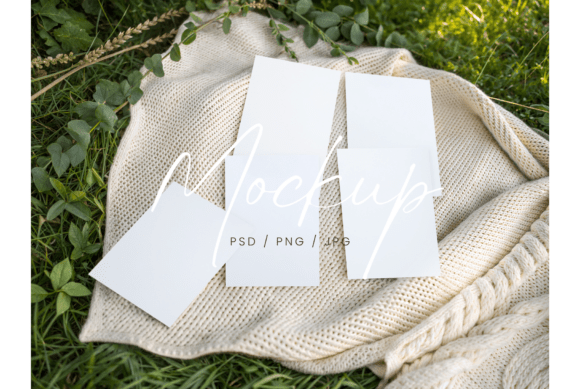
This mockup set is a digital tool designed for creators who need to visualize multiple 5x7 inch cards in a realistic layout. It includes a high-resolution 300 DPI PSD file with smart objects, making it easy to insert your designs directly into the template. The package also includes a JPG and a PNG file with transparent card areas, offering flexibility depending on your output needs.
It's especially useful for designers creating cards for events like bridal showers, baby showers, or party games. The mockup gives a tangible preview of how the final product will look, helping you make adjustments before production or client approval.
How to Use the Mockup in Your Design Workflow
Integrating the Game Cards Mockup, 5x7 into your design process can enhance both efficiency and presentation quality. Here's how it fits into different stages of a project:
- Before starting print or digital production, use the mockup to test layout, color accuracy, and visual balance.
- During client reviews or team collaborations, share the mockup to get feedback on design direction without finalizing the assets.
- After completing the design, present the mockup as part of your portfolio or sales listing to show polished, real-world applications of your work.
Compatibility and Integration with Other Tools
The mockup works seamlessly with Adobe Photoshop, allowing for quick edits through smart objects. This makes it compatible with most design workflows where Photoshop is already in use. Designers can easily swap out placeholder images with their own card designs, ensuring a consistent and professional look across multiple cards.
Because the set includes a transparent PNG version, it can also be layered into other digital compositions or marketing materials, such as website banners or social media posts for product launches.
Practical Tips for Using the Game Cards Mockup
Here are some implementation strategies to get the most out of this tool:
- Prepare your card designs at the correct 5x7 inch size before inserting them into the mockup. This ensures a proper fit and maintains resolution quality.
- Use layer naming conventions within the PSD file to keep track of which cards are which, especially when showcasing multiple designs in one set.
- Experiment with background variations using the transparent PNG file to see how your cards look in different contexts, such as table settings or digital previews.
- Save multiple versions of the mockup with different design iterations to compare options or present variations to clients.
How It Fits Into Business and Creative Workflows
For entrepreneurs and small business owners selling printable games or stationery on platforms like Etsy, the Game Cards Mockup, 5x7 is a valuable asset for product listings. High-quality visuals increase buyer confidence and can lead to higher conversion rates. Instead of photographing physical samples, sellers can generate polished previews directly from digital files.
Designers working on client projects can also use the mockup during the proposal phase to show how their designs will appear in real-life use. This helps align expectations and reduces the need for extensive revisions later in the process.
Usability and Long-Term Value
The mockup is built for ease of use, even for those who aren’t Photoshop experts. Once you understand how to replace smart objects, the process becomes intuitive and repeatable. Over time, having a consistent mockup style across different projects helps maintain a professional brand image.
Because it's a high-resolution file, the mockup remains useful across multiple projects. Whether you're updating your portfolio annually or launching a new product line, the ability to reuse this mockup without quality loss adds long-term value.
Quality Control and Consistency
One of the key benefits of using a mockup like this is maintaining consistency in presentation. When you're managing multiple card designs or seasonal variations, the mockup ensures each preview looks cohesive. This is especially important for branding purposes or when presenting a product line rather than a single item.
Before finalizing a design, compare how it looks in the mockup versus your working file. This step helps catch any alignment issues, color shifts, or font inconsistencies that might not be obvious in the design software alone.
Final Thoughts on Integrating the Mockup Into Your Routine
The Game Cards Mockup, 5x7 is more than just a visual tool—it's a practical addition to any design, marketing, or product development workflow. Whether you're a freelancer preparing client deliverables, an Etsy seller optimizing listings, or a designer building a portfolio, this mockup streamlines the transition from digital design to real-world application.
By incorporating it early in your process and using it consistently, you’ll not only improve the quality of your presentations but also save time in revisions and approvals. It’s a small investment that pays off in clarity, professionalism, and confidence in your final output.